Tạo biểu mẫu mạnh mẽ trong vài phút
Kéo và thả
Nhiều bước
Tích hợp
Tính năng BB Form Builder
Mọi thứ bạn cần để tạo biểu mẫu chuyên nghiệp cho website.
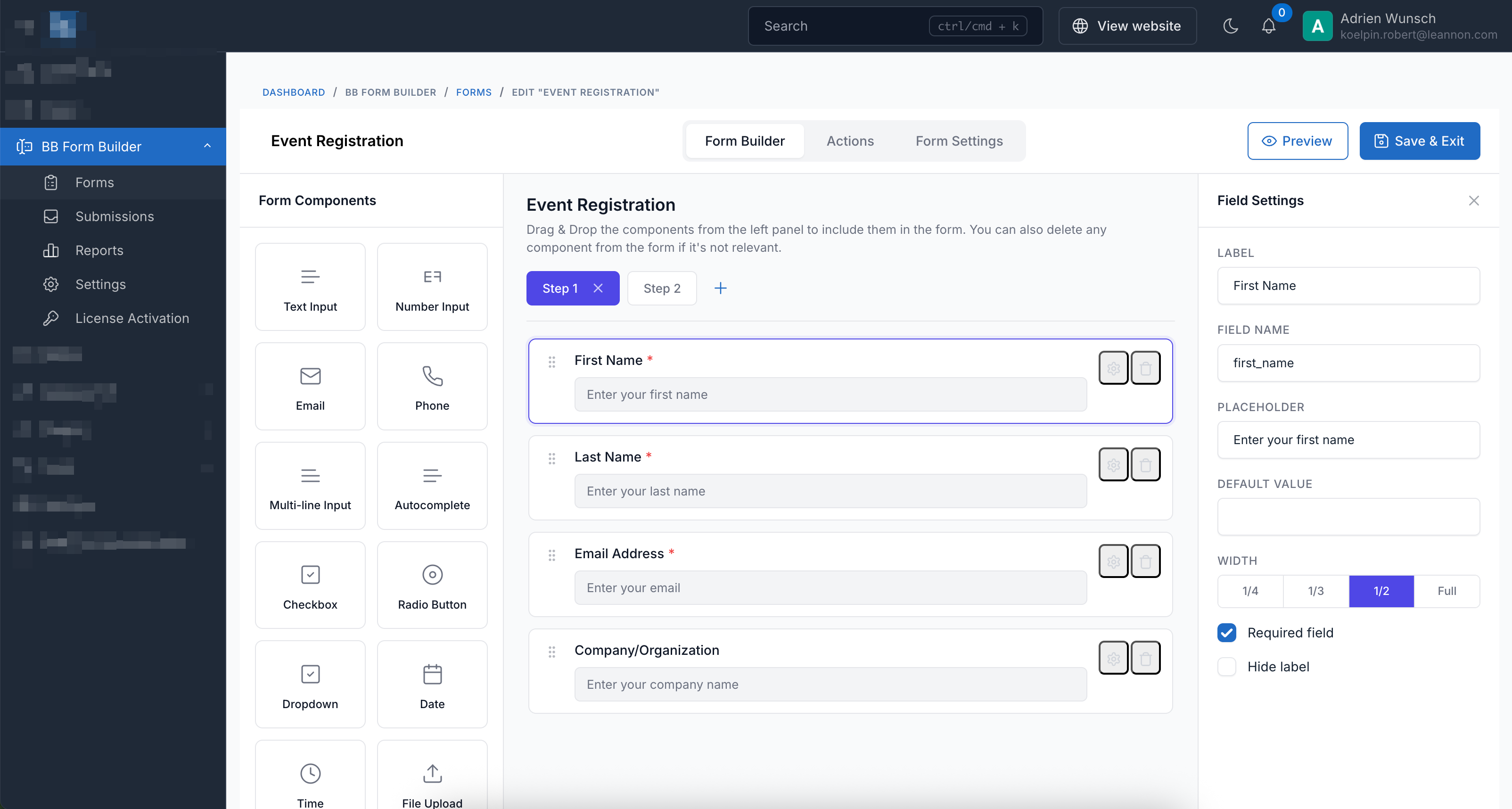
Trình tạo kéo thả
Trình tạo trực quan với giao diện kéo thả. Không cần lập trình để tạo biểu mẫu đẹp.
Biểu mẫu nhiều bước
Chia biểu mẫu dài thành các bước dễ quản lý với bố cục wizard ngang hoặc dọc.
Hơn 15 loại trường
Văn bản, email, điện thoại, select, checkbox, radio, tải file, chọn ngày, đánh giá sao, và nhiều hơn nữa.
Thông báo email
Gửi thông báo email tùy chỉnh cho quản trị viên và phản hồi tự động cho người dùng.
Webhooks và tích hợp
Kết nối với Zapier, Make hoặc bất kỳ endpoint webhook nào. Tích hợp với Mailchimp và GetResponse.
Bảo vệ chống spam
Hỗ trợ tích hợp Google reCAPTCHA và CAPTCHA toán học để ngăn chặn spam.
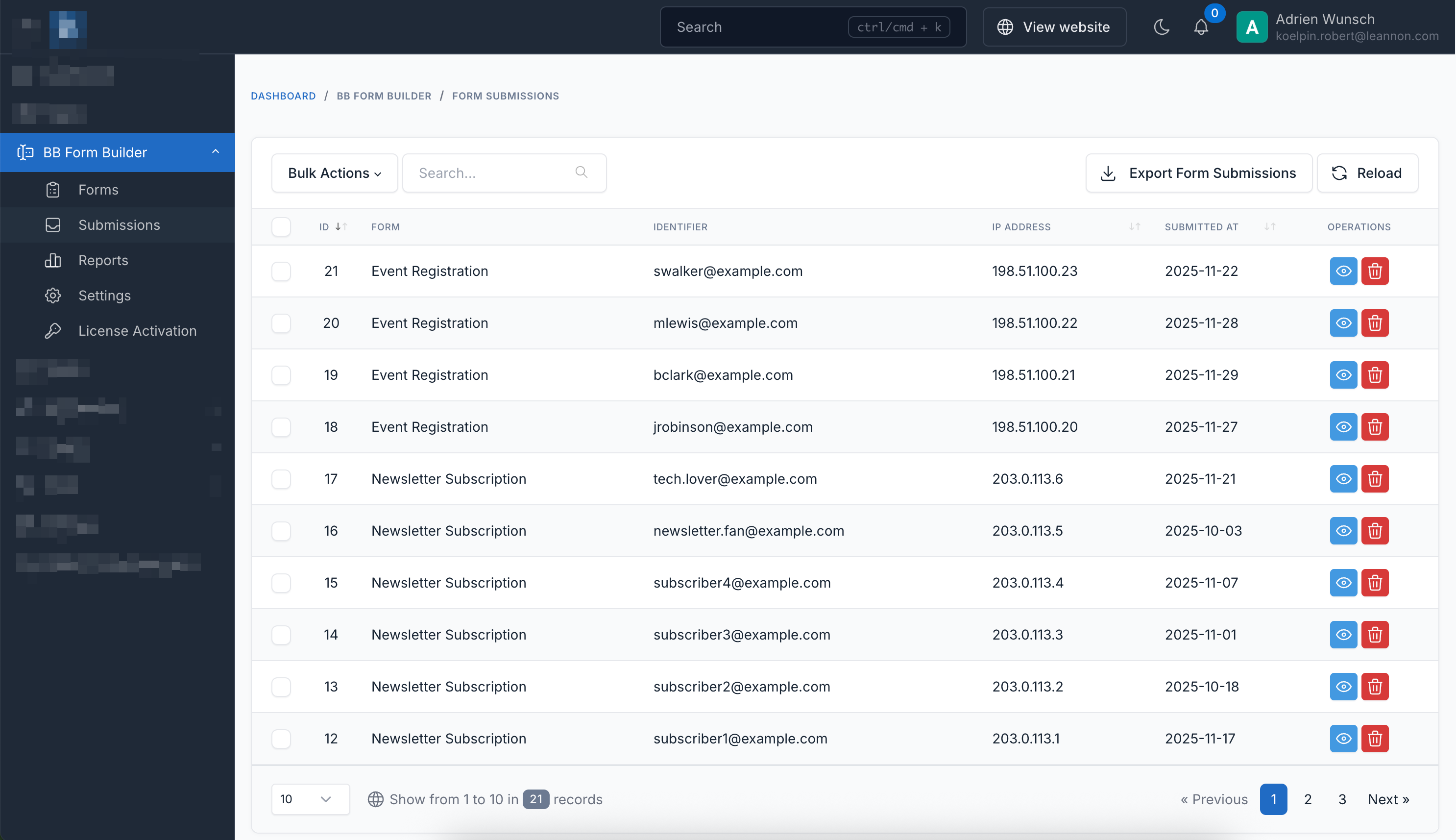
Xuất dữ liệu gửi
Xuất dữ liệu biểu mẫu sang định dạng CSV hoặc Excel để phân tích và báo cáo.
Nhúng mọi nơi
Sử dụng shortcode hoặc nhúng biểu mẫu qua iframe trên các website bên ngoài với đầy đủ định dạng.
Xem trước trực tiếp
Xem trước biểu mẫu theo thời gian thực khi xây dựng. Xem chính xác cách nó sẽ hiển thị trên máy tính, máy tính bảng và điện thoại.
Hướng dẫn bắt đầu nhanh
- Điều hướng đến Bảng điều khiển > BB Form Builder > Biểu mẫu
- Nhấn "Tạo" để xây dựng biểu mẫu mới
- Kéo các trường từ bảng bên trái vào vùng làm việc
- Cấu hình cài đặt trường (nhãn, placeholder, xác thực)
- Thiết lập hành động (thông báo email, webhooks, v.v.)
- Lưu và nhúng bằng shortcode hoặc iframe
Hành động có sẵn
Hoàn toàn tương thích
BB Form Builder hoàn toàn tương thích với tất cả các script Botble CMS có sẵn trên CodeCanyon.
Biểu mẫu bật lên
Hiển thị biểu mẫu trong popup với các tùy chọn kích hoạt khác nhau
Nhấp nút
Biểu mẫu mở khi người dùng nhấp vào nút. Tốt nhất cho biểu mẫu liên hệ, đăng ký và hành động theo yêu cầu.
Trì hoãn thời gian
Nhấp để xem trước (tự động kích hoạt đã tắt cho demo)Biểu mẫu xuất hiện tự động sau một khoảng thời gian (5 giây). Tuyệt vời cho đăng ký nhận bản tin.
Phần trăm cuộn
Nhấp để xem trước (tự động kích hoạt đã tắt cho demo)Biểu mẫu xuất hiện khi người dùng cuộn qua 50% trang. Lý tưởng cho biểu mẫu phản hồi.
Ý định thoát
Nhấp để xem trước (tự động kích hoạt đã tắt cho demo)Biểu mẫu xuất hiện khi người dùng di chuyển con trỏ để rời trang. Hoàn hảo để giữ chân khách truy cập.
Chế độ hiển thị Popup
Cấu hình cài đặt popup trong trình tạo biểu mẫu tại Cài đặt → Cài đặt hiển thị Popup. Chọn từ Nhấp nút, Trì hoãn thời gian, Phần trăm cuộn, hoặc Ý định thoát. Mỗi popup chỉ hiển thị một lần mỗi phiên (ngoại trừ popup kích hoạt bằng nút).
Các kiểu biểu mẫu
Chọn từ 5 kiểu biểu mẫu đẹp để phù hợp với thiết kế website của bạn
Biểu mẫu liên hệ
Đăng ký bản tin
Phản hồi khách hàng
Ứng tuyển
Đăng ký sự kiện
Xem hoạt động thực tế
Trải nghiệm sức mạnh và sự đơn giản của trình tạo biểu mẫu.
Trình tạo kéo thả trực quan
Quản lý gửi biểu mẫu liền mạch
Hướng dẫn cài đặt
Bắt đầu nhanh chóng với quy trình cài đặt đơn giản.
Yêu cầu
-
Botble CMSPhiên bản 7.5.0 trở lên
-
PHPPhiên bản 8.2 trở lên
-
Bản quyềnMã mua hàng hợp lệ từ CodeCanyon
Các bước cài đặt
Tải Plugin
Tải file ZIP plugin từ Tải xuống từ CodeCanyon trang.
Giải nén file ZIP
Giải nén file ZIP đã tải về máy tính của bạn.
Tải lên máy chủ
Tải thư mục đã giải nén lên máy chủ của bạn tại:
platform/plugins/bb-form-builder
Kích hoạt Plugin
Đi đến Bảng điều khiển → Plugins và nhấn vào Kích hoạt nút.
Nhập mã bản quyền
Điều hướng đến Bảng điều khiển → Cài đặt → Chung và nhập mã mua hàng để kích hoạt bản quyền.
Bắt đầu tạo biểu mẫu!
Truy cập BB Form Builder từ menu thanh bên quản trị và tạo biểu mẫu đầu tiên của bạn.
Mẹo chuyên nghiệp
Sau khi cài đặt, hãy xem tài liệu để xem hướng dẫn chi tiết về tạo biểu mẫu, thiết lập thông báo email và tích hợp với dịch vụ bên thứ ba.
Nhúng biểu mẫu trên bất kỳ website nào
Nhúng qua iframe
Dễ dàng nhúng biểu mẫu của bạn vào bất kỳ trang web bên ngoài nào bằng iframe. Chọn một trong các định dạng URL bên dưới:
URL dễ đọc sử dụng mã biểu mẫu
<iframe
    src="https://bb-form-builder.botble.com/form/your-form-code"
    width="100%"
    height="500"
    frameborder="0"
></iframe>Sử dụng hash để bảo mật tốt hơn (khuyến nghị cho biểu mẫu nhạy cảm)
<iframe
    src="https://bb-form-builder.botble.com/forms/abc123xyz/embed"
    width="100%"
    height="500"
    frameborder="0"
></iframe>
Nhúng qua JavaScript
Để kiểm soát tốt hơn và tương thích đa thiết bị, sử dụng mã JavaScript nhúng của chúng tôi:
<div id="bb-form-builder-container"></div>
<script src="https://bb-form-builder.botble.com/vendor/core/plugins/bb-form-builder/js/embed.js?v=1.1.3"></script>
<script>
    document.addEventListener("DOMContentLoaded", function() {
        BbFormBuilder.embed({
            container: '#bb-form-builder-container',
            formCode: 'your-form-code',
            version: '1.1.3'
        });
    });
</script>
Mẹo chuyên nghiệp
Bạn có thể tìm thấy cả hai định dạng URL trong tab Cài đặt của biểu mẫu dưới mục "Mã nhúng".
Demo nhúng trực tiếp
Xem trước
Chưa tảiNhấn "Tải biểu mẫu" để xem trước biểu mẫu nhúng
Mã nhúng
<iframe
    src="https://bb-form-builder.botble.com/form/contact-form"
    width="100%"
    height="500"
    frameborder="0"
></iframe>Integrate with Another Botble CMS Site
Easily embed forms from your BB Form Builder installation into any Botble CMS website.
How It Works
This integration allows you to host BB Form Builder on one site (e.g., form.domain.com) and embed forms on other Botble CMS sites using a simple shortcode. The forms are loaded via JavaScript for seamless integration.
1 Create Integration File
Create a new file named form-builder-integration.php in your theme's functions folder:
platform/themes/[your-theme]/functions/form-builder-integration.php
2 Add the Following Code
Copy and paste this code into your integration file. Update the $formBuilderBaseUrl to match your BB Form Builder installation URL:
<?php

use Botble\Shortcode\Compilers\Shortcode;

/**
 * BB Form Builder Integration for Botble CMS
 *
 * This file integrates forms from a remote BB Form Builder installation
 * into this Botble CMS site using the Embed via JavaScript feature.
 *
 * Instructions:
 * 1. Copy this file to: platform/themes/[your-theme]/functions/
 * 2. Update the $formBuilderBaseUrl variable below
 * 3. Use the shortcode: [bb-form-builder-integration code="your-form-code"]
 */

// Configure your BB Form Builder installation URL (no trailing slash)
$formBuilderBaseUrl = 'https://bb-form-builder.botble.com';
$embedVersion = '1.1.3';

app()->booted(function () use ($formBuilderBaseUrl, $embedVersion): void {
    // Add the embed.js script to the footer
    add_filter(THEME_FRONT_FOOTER, function (?string $html) use ($formBuilderBaseUrl, $embedVersion): string {
        static $scriptAdded = false;

        if ($scriptAdded) {
            return $html;
        }

        $scriptAdded = true;

        $script = <<<HTML
<script src="{$formBuilderBaseUrl}/vendor/core/plugins/bb-form-builder/js/embed.js?v={$embedVersion}"></script>
HTML;

        return $html . $script;
    }, 100);

    // Register the shortcode to render forms
    add_shortcode(
        'bb-form-builder-integration',
        'BB Form Builder Integration',
        'Embed a form from your BB Form Builder installation',
        function (Shortcode $shortcode) use ($formBuilderBaseUrl, $embedVersion) {
            $formCode = $shortcode->code;

            if (empty($formCode)) {
                return '<p class="text-danger">Error: code attribute is required.</p>';
            }

            // Generate a unique container ID
            $containerId = 'bb-form-' . md5($formCode . uniqid());

            return <<<HTML
<div id="{$containerId}"></div>
<script>
document.addEventListener("DOMContentLoaded", function() {
    if (typeof BbFormBuilder !== 'undefined') {
        BbFormBuilder.embed({
            container: '#{$containerId}',
            formCode: '{$formCode}',
            baseUrl: '{$formBuilderBaseUrl}',
            version: '{$embedVersion}'
        });
    } else {
        document.getElementById('{$containerId}').innerHTML =
            '<p class="text-danger">BB Form Builder script not loaded.</p>';
    }
});
</script>
HTML;
        }
    );

    // Optional: Add admin UI for the shortcode
    shortcode()->setAdminConfig('bb-form-builder-integration', function (array $attributes) {
        return '
            <div class="mb-3">
                <label class="form-label">Form Code</label>
                <input type="text" name="code" value="' . ($attributes['code'] ?? '') . '" class="form-control" placeholder="e.g., contact-form">
                <div class="form-text">Enter the form code from your BB Form Builder installation.</div>
            </div>
        ';
    });
});3 Use the Shortcode
Add this shortcode to any page or post on your Botble CMS site:
[bb-form-builder-integration code="your-form-code"]Examples:
[bb-form-builder-integration code="contact-form"][bb-form-builder-integration code="newsletter"][bb-form-builder-integration code="job-application"]
Finding Your Form Code
- Go to your BB Form Builder admin panel
- Open the form you want to embed
- Click on the "Settings" tab
- Find the "Form Code" field
- Copy the code (e.g., "contact-form")
Cross-Domain Support
BB Form Builder supports cross-domain embedding out of the box. No additional CORS configuration is required. Simply install BB Form Builder on your form server and embed forms on any website using the shortcode above.
Pro Tips
- Use a subdomain like form.yourdomain.com to host your BB Form Builder installation for easier management.
- The embed script is loaded only once, even if you have multiple forms on the same page.
- Form submissions are processed on your BB Form Builder server, keeping your main site lightweight.
- You can customize the form styling using CSS on your theme.
Cách sử dụng
Cách sử dụng Shortcode
Sử dụng shortcode sau để nhúng biểu mẫu vào trang của bạn:
[bb-form-builder code="your-form-code"][/bb-form-builder]Biểu mẫu demo có sẵn
contact-form- Biểu mẫu liên hệ đơn giảncustomer-feedback- Khảo sát nhiều bước với đánh giá saojob-application- Biểu mẫu nhiều bước với tải file lênnewsletter- Đăng ký nhận bản tinevent-registration- Đăng ký sự kiện với nhiều trường
Sẵn sàng bắt đầu?
Tạo biểu mẫu chuyên nghiệp trong vài phút
Biến đổi website của bạn với các biểu mẫu mạnh mẽ, đẹp mắt. Tạo biểu mẫu liên hệ, khảo sát, đăng ký và nhiều hơn nữa với trình tạo kéo thả trực quan.