Build Powerful Forms in Minutes
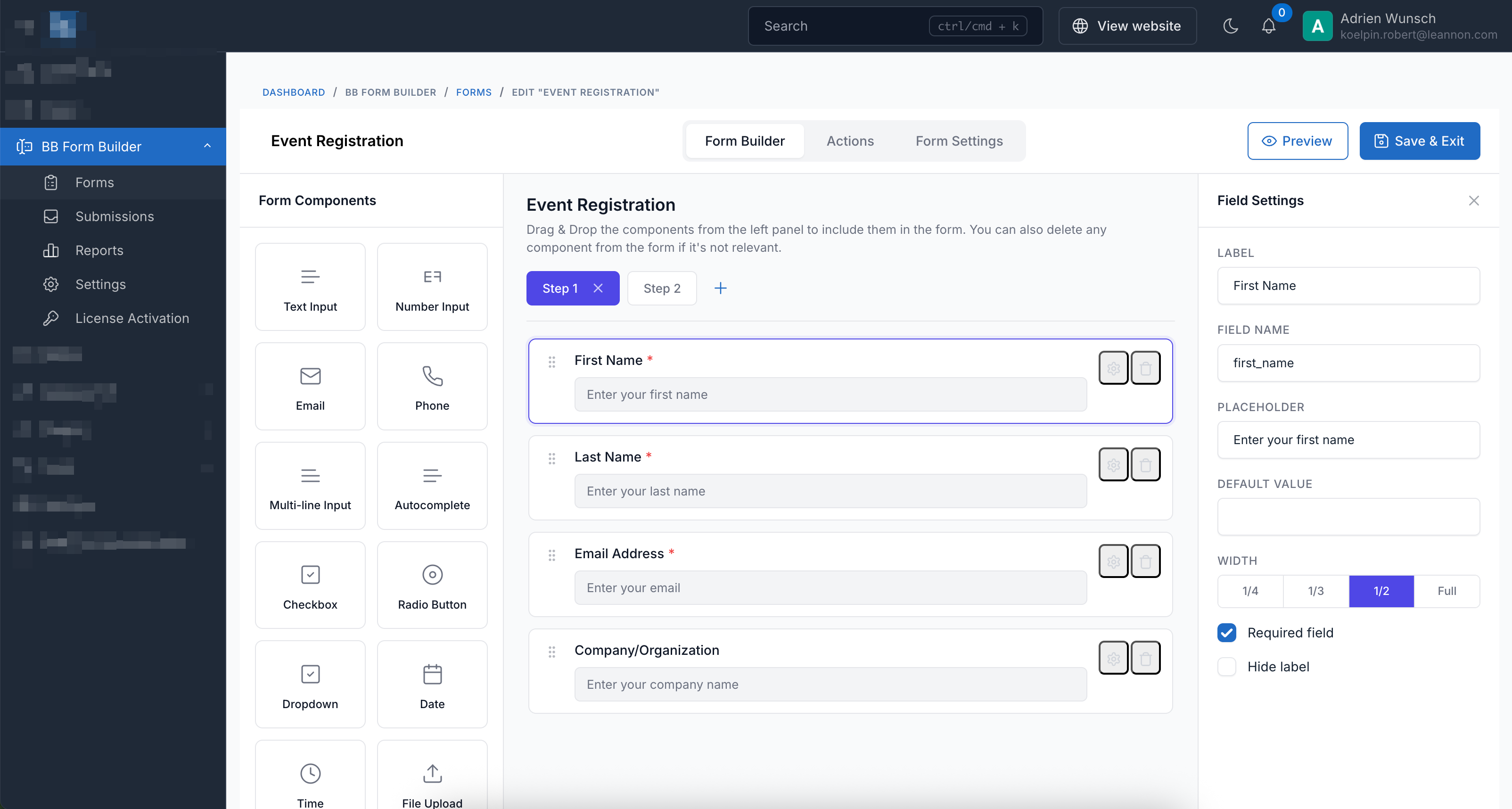
Drag & Drop
Multi-Step
Integrations
BB Form Builder Features
Everything you need to create professional forms for your website.
Drag & Drop Builder
Intuitive visual builder with drag-and-drop interface. No coding required to create beautiful forms.
Multi-Step Forms
Break long forms into manageable steps with horizontal or vertical wizard layouts.
15+ Field Types
Text, email, phone, select, checkbox, radio, file upload, date picker, star rating, and more.
Email Notifications
Send customizable email notifications to admins and auto-responders to users.
Webhooks & Integrations
Connect to Zapier, Make, or any webhook endpoint. Integrate with Mailchimp and GetResponse.
Spam Protection
Built-in support for Google reCAPTCHA and math CAPTCHA to prevent spam submissions.
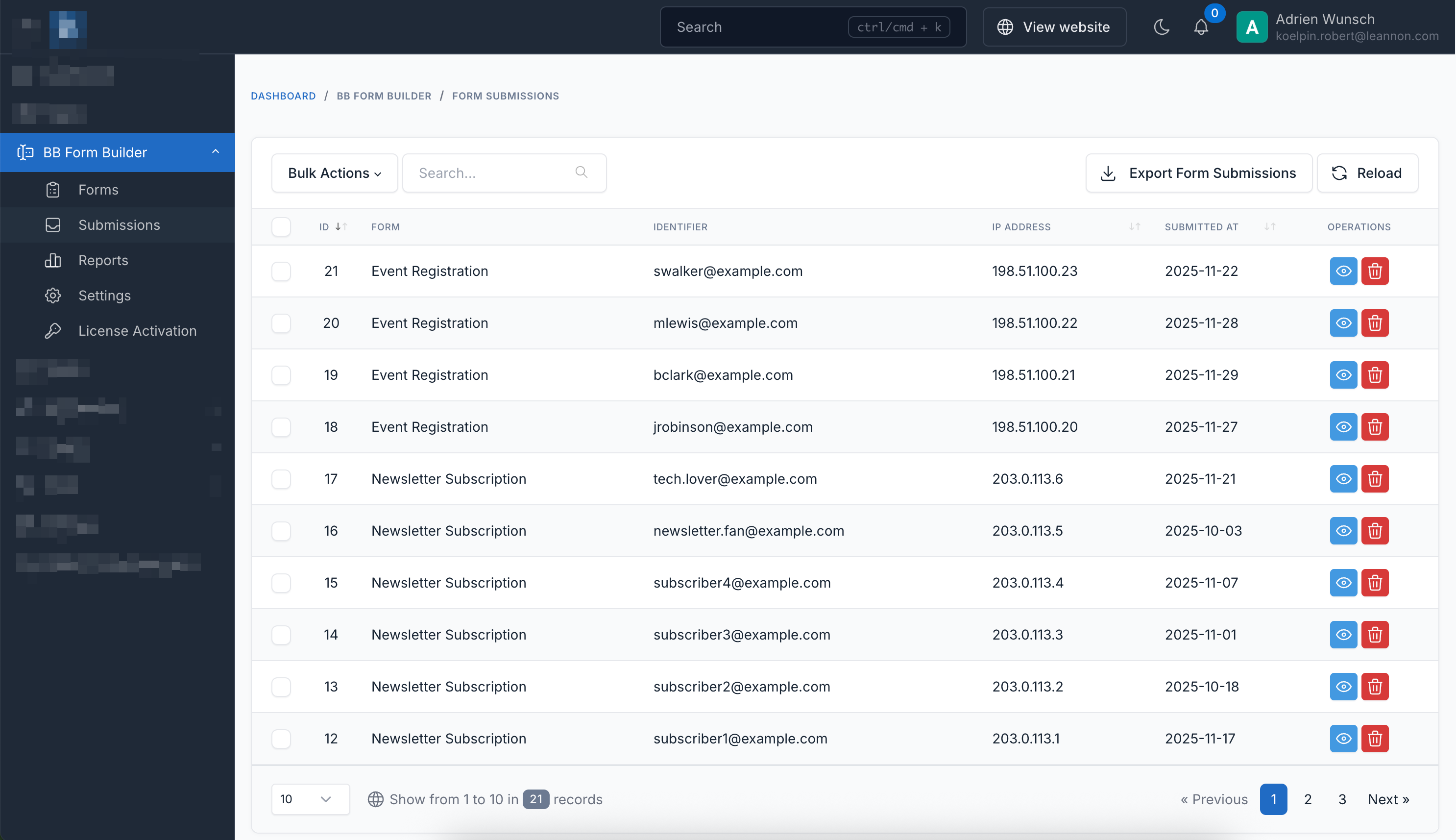
Export Submissions
Export form submissions to CSV or Excel format for analysis and reporting.
Embed Anywhere
Use shortcodes or embed forms via iframe on external websites with full styling.
Live Preview
Preview your form in real-time while building. See exactly how it will look on desktop, tablet, and mobile.
Quick Start Guide
- Navigate to Admin Panel > BB Form Builder > Forms
- Click "Create" to build a new form
- Drag fields from the left panel onto the canvas
- Configure field settings (label, placeholder, validation)
- Set up actions (email notifications, webhooks, etc.)
- Save and embed using shortcode or iframe
Available Actions
Fully Compatible
BB Form Builder is fully compatible with all Botble CMS scripts available on CodeCanyon.
Popup Forms
Display forms in modal popups with various trigger options
Button Click
Form opens when user clicks a button. Best for contact forms, sign-ups, and on-demand actions.
Time Delay
Click to preview (auto-trigger disabled for demo)Form appears automatically after a set time (5 seconds). Great for newsletter sign-ups.
Scroll Percentage
Click to preview (auto-trigger disabled for demo)Form appears when user scrolls past 50% of the page. Ideal for feedback forms.
Exit Intent
Click to preview (auto-trigger disabled for demo)Form appears when user moves cursor to leave the page. Perfect for capturing leaving visitors.
Popup Display Modes
Configure popup settings in the form builder under Settings → Popup Display Settings. Choose from Button Click, Time Delay, Scroll Percentage, or Exit Intent triggers. Each popup shows only once per session (except button-triggered popups).
Form Styles
Choose from 5 beautiful form styles to match your website design
Contact Form
Newsletter Subscription
Customer Feedback
Job Application
Event Registration
See it in Action
Experience the power and simplicity of our form builder.
Intuitive Drag & Drop Builder
Seamless Submission Management
Installation Guide
Get up and running in minutes with our simple installation process.
Requirements
-
Botble CMSVersion 7.5.0 or higher
-
PHPVersion 8.2 or higher
-
LicenseValid purchase code from CodeCanyon
Installation Steps
Download the Plugin
Download the plugin ZIP file from your CodeCanyon Downloads page.
Extract the ZIP File
Extract the downloaded ZIP file to your local computer.
Upload to Server
Upload the extracted folder to your server at:
platform/plugins/bb-form-builder
Activate the Plugin
Go to Admin Panel → Plugins and click the Activate button.
Enter License Key
Navigate to Admin Panel → Settings → General and enter your purchase code to activate the license.
Start Building Forms!
Access BB Form Builder from the admin sidebar menu and create your first form.
Pro Tip
After installation, check out the documentation for detailed guides on creating forms, setting up email notifications, and integrating with third-party services.
Embed Forms on Any Website
Embed via iframe
Easily embed your forms on any external website using an iframe. Choose one of the URL formats below:
Human-readable URL using form code
<iframe
    src="https://bb-form-builder.botble.com/form/your-form-code"
    width="100%"
    height="500"
    frameborder="0"
></iframe>Uses hash for better security (recommended for sensitive forms)
<iframe
    src="https://bb-form-builder.botble.com/forms/abc123xyz/embed"
    width="100%"
    height="500"
    frameborder="0"
></iframe>
Embed via JavaScript
For more control and better responsiveness, use our JavaScript embed code:
<div id="bb-form-builder-container"></div>
<script src="https://bb-form-builder.botble.com/vendor/core/plugins/bb-form-builder/js/embed.js?v=1.1.3"></script>
<script>
    document.addEventListener("DOMContentLoaded", function() {
        BbFormBuilder.embed({
            container: '#bb-form-builder-container',
            formCode: 'your-form-code',
            version: '1.1.3'
        });
    });
</script>
Pro Tip
You can find both URL formats in your form's Settings tab under "Embed Code".
Live Embed Demo
Preview
Not loadedClick "Load Form" to preview the embedded form
Embed Code
<iframe
    src="https://bb-form-builder.botble.com/form/contact-form"
    width="100%"
    height="500"
    frameborder="0"
></iframe>Integrate with Another Botble CMS Site
Easily embed forms from your BB Form Builder installation into any Botble CMS website.
How It Works
This integration allows you to host BB Form Builder on one site (e.g., form.domain.com) and embed forms on other Botble CMS sites using a simple shortcode. The forms are loaded via JavaScript for seamless integration.
1 Create Integration File
Create a new file named form-builder-integration.php in your theme's functions folder:
platform/themes/[your-theme]/functions/form-builder-integration.php
2 Add the Following Code
Copy and paste this code into your integration file. Update the $formBuilderBaseUrl to match your BB Form Builder installation URL:
<?php

use Botble\Shortcode\Compilers\Shortcode;

/**
 * BB Form Builder Integration for Botble CMS
 *
 * This file integrates forms from a remote BB Form Builder installation
 * into this Botble CMS site using the Embed via JavaScript feature.
 *
 * Instructions:
 * 1. Copy this file to: platform/themes/[your-theme]/functions/
 * 2. Update the $formBuilderBaseUrl variable below
 * 3. Use the shortcode: [bb-form-builder-integration code="your-form-code"]
 */

// Configure your BB Form Builder installation URL (no trailing slash)
$formBuilderBaseUrl = 'https://bb-form-builder.botble.com';
$embedVersion = '1.1.3';

app()->booted(function () use ($formBuilderBaseUrl, $embedVersion): void {
    // Add the embed.js script to the footer
    add_filter(THEME_FRONT_FOOTER, function (?string $html) use ($formBuilderBaseUrl, $embedVersion): string {
        static $scriptAdded = false;

        if ($scriptAdded) {
            return $html;
        }

        $scriptAdded = true;

        $script = <<<HTML
<script src="{$formBuilderBaseUrl}/vendor/core/plugins/bb-form-builder/js/embed.js?v={$embedVersion}"></script>
HTML;

        return $html . $script;
    }, 100);

    // Register the shortcode to render forms
    add_shortcode(
        'bb-form-builder-integration',
        'BB Form Builder Integration',
        'Embed a form from your BB Form Builder installation',
        function (Shortcode $shortcode) use ($formBuilderBaseUrl, $embedVersion) {
            $formCode = $shortcode->code;

            if (empty($formCode)) {
                return '<p class="text-danger">Error: code attribute is required.</p>';
            }

            // Generate a unique container ID
            $containerId = 'bb-form-' . md5($formCode . uniqid());

            return <<<HTML
<div id="{$containerId}"></div>
<script>
document.addEventListener("DOMContentLoaded", function() {
    if (typeof BbFormBuilder !== 'undefined') {
        BbFormBuilder.embed({
            container: '#{$containerId}',
            formCode: '{$formCode}',
            baseUrl: '{$formBuilderBaseUrl}',
            version: '{$embedVersion}'
        });
    } else {
        document.getElementById('{$containerId}').innerHTML =
            '<p class="text-danger">BB Form Builder script not loaded.</p>';
    }
});
</script>
HTML;
        }
    );

    // Optional: Add admin UI for the shortcode
    shortcode()->setAdminConfig('bb-form-builder-integration', function (array $attributes) {
        return '
            <div class="mb-3">
                <label class="form-label">Form Code</label>
                <input type="text" name="code" value="' . ($attributes['code'] ?? '') . '" class="form-control" placeholder="e.g., contact-form">
                <div class="form-text">Enter the form code from your BB Form Builder installation.</div>
            </div>
        ';
    });
});3 Use the Shortcode
Add this shortcode to any page or post on your Botble CMS site:
[bb-form-builder-integration code="your-form-code"]Examples:
[bb-form-builder-integration code="contact-form"][bb-form-builder-integration code="newsletter"][bb-form-builder-integration code="job-application"]
Finding Your Form Code
- Go to your BB Form Builder admin panel
- Open the form you want to embed
- Click on the "Settings" tab
- Find the "Form Code" field
- Copy the code (e.g., "contact-form")
Cross-Domain Support
BB Form Builder supports cross-domain embedding out of the box. No additional CORS configuration is required. Simply install BB Form Builder on your form server and embed forms on any website using the shortcode above.
Pro Tips
- Use a subdomain like form.yourdomain.com to host your BB Form Builder installation for easier management.
- The embed script is loaded only once, even if you have multiple forms on the same page.
- Form submissions are processed on your BB Form Builder server, keeping your main site lightweight.
- You can customize the form styling using CSS on your theme.
How to Use
Shortcode Usage
Use the following shortcode to embed forms in your pages:
[bb-form-builder code="your-form-code"][/bb-form-builder]Available Demo Forms
contact-form- Simple contact formcustomer-feedback- Multi-step survey with star ratingjob-application- Multi-step form with file uploadnewsletter- Newsletter subscriptionevent-registration- Event registration with multiple fields
Ready to Get Started?
Build Professional Forms in Minutes
Transform your website with powerful, beautiful forms. Create contact forms, surveys, registrations, and more with our intuitive drag-and-drop builder.